
Cycles: All Standard Cycles
This command enables to program fillet or chamfer on the pocket and/or island bottom and taper on the pocket and/or islands sides.
We can differentiate 2 cases:
-
If you are working on a solid, using the solid profiles: set 'Reading on solid' to Yes, in order to get the values of taper, fillet and chamfer directly on the solid model. In this case, the other values have not to be filled.
-
If you are working on 2D geometry, set 'Reading on solid' to No.
Click on the option you want, you can combine them and check your choice with the dynamic icons.
Top Options
|
Top Options: 7 options are available for the top face of the pocket and its islands: |
|

|
Normal: no fillet nor chamfer |

|
Fillet: radius is programmed both on pocket and islands |

|
Pocket Fillet: radius is programmed only on top of the pocket |

|
Island Fillet: radius is programmed only on top of the island |

|
Chamfer: chamfer is programmed both on pocket and islands |

|
Pocket chamfer: chamfer is programmed only on top of the pocket |

|
Island chamfer: chamfer is programmed only on top of the island |
Side Options
|
Side Options: 4 options are available for the flanks of the pocket and its islands: |
|
|
|
Normal: no fillet nor chamfer. |

|
Taper: Taper is programmed both on pocket and islands. |

|
Tapered Pocket: Taper is programmed only on the pocket. |

|
Tapered Island: Taper is programmed only on the island. |
Bottom Options
|
Bottom Options: 7 options are available for the bottom of the pocket: |
|
|
|
Normal: no fillet nor chamfer |

|
Fillet: radius is programmed both on pocket and islands |

|
Pocket Fillet: radius is programmed only on the pocket bottom |

|
Island Fillet: radius is programmed only on the island bottom |

|
Chamfer: chamfer is programmed both on pocket and islands |

|
Pocket chamfer: chamfer is programmed only on the pocket bottom |

|
Island chamfer: chamfer is programmed only on the island bottom |
According to the chosen options, some parameters are accessible or not, ready to be filled:
For Top and Bottom:
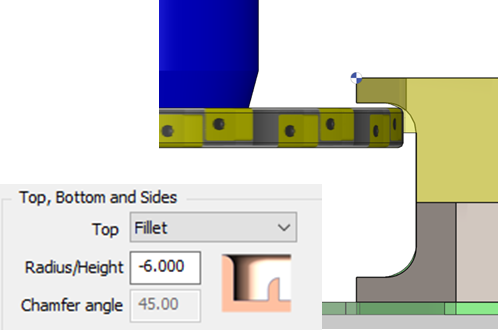
- Radius / Height: enter the radius value if Fillet is chosen, enter the chamfer height if chamfer is chosen.
- Chamfer angle: angle of the chamfer.
|
For a contouring cycle, you can define a negative radius value, in order to machine inverted fillet for a ‘slot’ with a Side and Face cutter. |
|
- Scallop Value: value of the crest on the taper.
Angle Options (this option is not available for the Z repeat cycles):
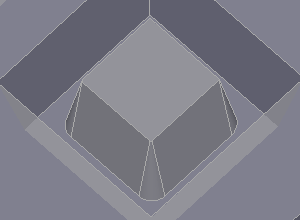
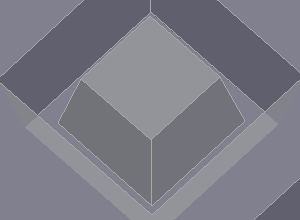
when a taper is programmed, the angles can be machined in 2 different ways:
|
Round shape |
Sharp angle |
|
|