
Cycle: Contouring, Finish Contour, Cutting
These parameters are common for all the cycles listed above.
Z Step (Ap)
This is the Z increment between each pass. It corresponds to the cutting of the total depth. If the incremental depth is greater than the maximum depth of pass of the tool, there is a warning message.
Continuous Toolpath
Choose whether to program the plunge in continuous mode or not. This command is for the plunge to be done during the profile following or not.
|
▶️ Watch a video about Continuous Toolpath.
|
|
|
Final Pass at constant Z
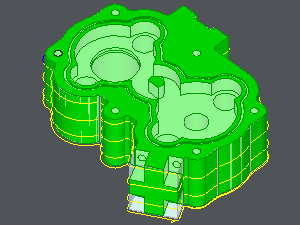
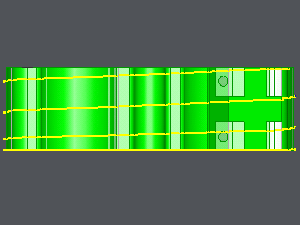
Definition of a contouring toolpath with an helix toolpath.
The slope angle is linked to the Z increment: the tool goes down with a Z increment value for each turn done.
It is also possible to add one or two finishing pass with no Z motion at the end of the machining.
The parameter 'Final Pass at constant Z' is available in the following options:

|
No |

|
One |

|
Two |
Take into consideration:
-
The parameter does not define overlengths on the toolpath.
-
It does not use an approach macro on the toolpath.
-
The profile machined has to be closed.
One final pass is done on this example.
|
|
The parameters below are specific either for Contouring or Finish Contour.
First pass with constant Z (for Contouring)
Using this parameter, it is possible to choose to add a first pass at constant Z or not.
Constant Z Step (for Finish Contour)

|
Yes: GO2cam recalculates the Z step, so that the different passes will have the same Z value. If the island altitude or the bottom altitude does not fit with the Z value, these surfaces won't be manufactured. It will remain a Z stock allowance on these surfaces. |

|
No: GO2cam recalculates the Z step, so that all the surfaces will be manufactured. |