
Cycle: Contouring
Definition
Definition of contouring passes in the XY plane.
Three parameters have to be filled:
|
Step 1 |
First fill the XY thickness of the material. |

|
|
Step 2 |
Once the thickness is filled, define the XY Step (Ae), XY increment, of the passes. Do not exceed the value of the tool diameter. |

|
|
Step 3 |
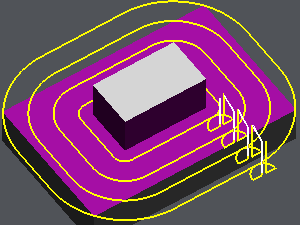
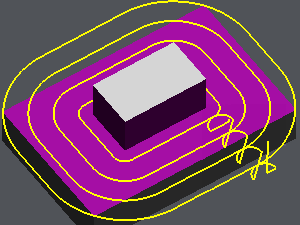
Choose if the passes are compact, no retract of the tool between the passes, or not, the tool goes out the material between the passes. The option is not available (greyed out) if the ‘Part’ toolpath is chosen: the passes will always be ‘independent’ (not compacted) and always have gain/loss of compensation for each pass. |

|
It is not possible to define a continuous plunge and a XY contouring simultaneously.
|
No Compacted passes |
Compacted passes |
|
|
|
As from V6.10, it’s now possible to manage the retract altitude (Without retract) when doing a lateral passes. Watch a video to see how the parameters is working. |
▶️ Watch a video about lateral passes. 
|