
Cycles: PAM, Roughing/Reworking (shape), Finish Contour (shape), Stock (Rough Reworking)
Definition
GO2cam researches the remaining material while applying the toolpath, by comparing the polyhedron covering the machined solid and the polyhedron calculated from previous machining operations (mode Cycle).
To simplify the stock calculation, the comparison can be done according to the ‘grey’ stock visible on screen. In that case, we take into account only the machining operations on which the stock calculation is set to ON (mode Last).
The last option 'Finish' is not included in cycle Finish Contour (shape)
Several modes to calculate the stock
|
Auto |
Mix of the 2 methods ‘Last’ and 'Cycle': the grey stock is taken for calculation except for the operations where stock calculation is OFF. In that case, the polyhedron is taken. |
|
Last |
Comparison with the last evolutive stock calculated. |
|
Cycle |
Comparison with the exact enveloppe (polyhedron) from previous machining cycles. This method is more precise, but also much longer than the method ‘Last’. |
|
Finishing |
Mode combined with the definition of a Reference diameter and Reference radius. This option manages Flat end mills but also Ball end mills and Radius end mills (by defining the radius of the tool). This option offers two main benefits:
This option can create false material in corners based on the Reference tool. It may generate some air-cutting toolpaths, which can help prevent collisions. Machining time may increase while calculation time decreases. Suitable, for example, for hard materials. |
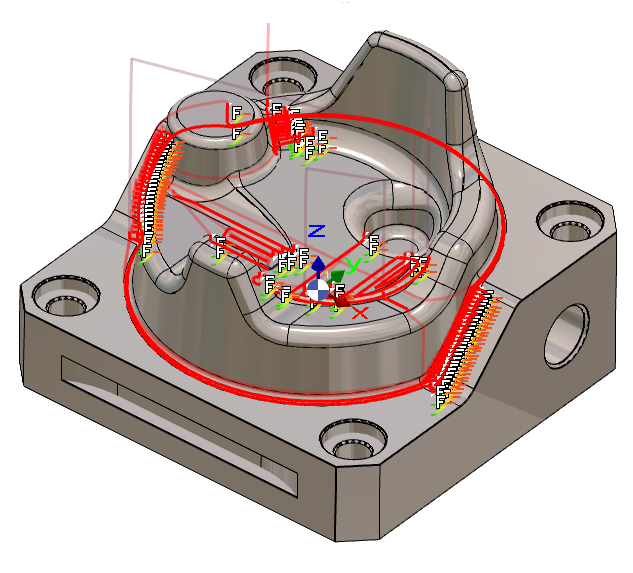
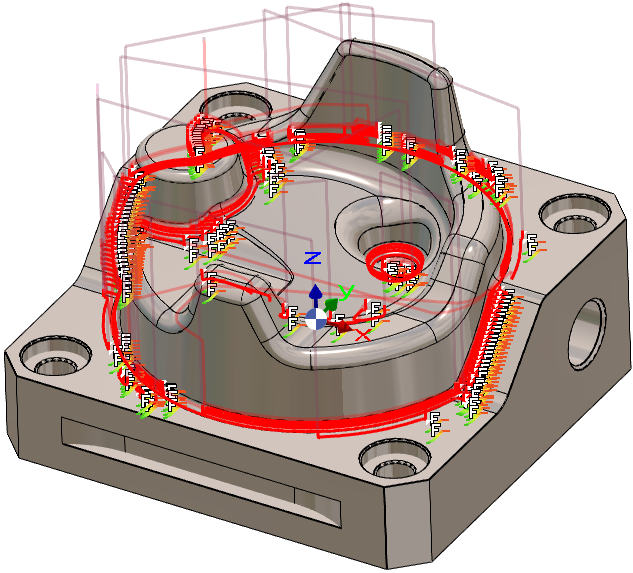
Below is an example of Stock Calculation in the Rough/Rework operation.
|
Auto Mode: the rework is programmed on the workpiece. |
Finishing with Reference diameter=10mm and radius=5mm. There are more toolpaths generated, especially on the fillets, for a better finishing quality. |
|
|