

|
4 axes toolpath calculated between a top profile and a bottom profile with the same number of elements. If this is not respected, you can use the command of synchro points, in design and EDM Geometry menu. |
Key Points
|
For this cycle, the amount of elements on the top and bottom profile needs to be the same.
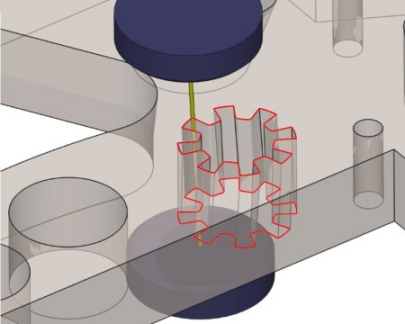
Workpieces that can be machined using this cycle can be such that the upper and lower profile are identical except that they are offset along the Z axis. One example can be seen on the picture. |
|
|
▶️ This video shows and explains the colors used for the 4 axes toolpaths: 
|
Strategy Parameters
|
Dialog Area |
Parameters |
|
|
Toolpath |
Mode |
Stop length |
|
Offset type |
Stop number |
|
|
Part position |
|
|
|
Corners |
||
Movement Parameters
|
Dialog Area |
Parameters |
|
|
Approach / Return |
|
|
|
Lead in and Lead out |
||
Technology Parameters
|
Dialog Area |
Parameters |
|
|
Cutting Conditions |
Feed rate |
Number of angle register |
|
Offset number |
||
|
Setting number |
Offset |
|
|
|
Quality |
|
|
User Fields |
Machine quality |
Comment |
|
Control Device |
Machining Set |
|
Options Parameters
|
Dialog Area |
Parameters |
|
|
Options |
Height of plane |
Segmentation |
|
Upper guide height |
Material height |
|
|
Lower guide height |
|
|
|
Curves Computing |
Curve Tolerance |
Explode curve in |