GO2cam Production Help

Cut, Copy and Paste

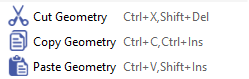
An entity may be relocated or duplicated utilizing the cut, copy, and paste commands accessible through the Edit menu or corresponding keyboard shortcuts.

image-20260317-070638.png

The standard procedure is as follows:

  1. Initiate the Cut or Copy command (e.g., press Ctrl+C).

  2. Select the desired entity or entities.

  3. Right-click to confirm the selection.

  4. Specify the origin of the selection.

  5. Execute the Paste command (press Ctrl+V) and click to place the content.

You can watch a video showing these operations in action.