
Cycle: Direct Grooving, Z Level, Zig Zag, Wtype, O Ring Type, Centering, Drilling, Drilling Reaming, Tapping, Die Threading, Parting, Pecking, Chamfering, Knurling
Definition
Ability to program dwell during the toolpath, according to several parameters:
-
Dwell Depth
-
Dwell Unit
-
Dwell
-
Final Dwell
Settings
-
Choose first the unit of the dwell: it can be expressed either in seconds or in revolution.
-
Then you can define the Dwell Depth, which is the distance between two dwells.
-
Dwell is the value in seconds or revolution, the code is often G04 with a letter (X or U for Fanuc, F for Num for example).
-
Final Dwell enables to define a different value at the end, to make a better finish at last pass.
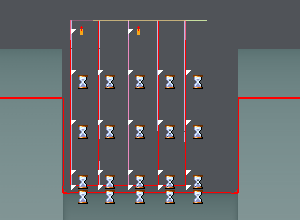
The dwell defined are displayed on the screen with the hourglass symbol as shown on the picture below.
|
In this example:
|
|
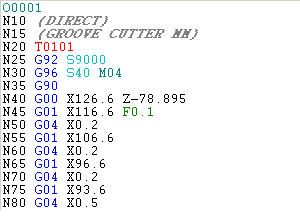
|
|
Special case for Direct, Z Level and Wtype Grooving operations.
The dwell defined in strategy is not applied on all the toolpath for those three operations. In a way, we can consider that the roughing passes are decomposed in two paths:
-
‘roughing' passes: vertical plunges are done by the tool and there the dwell can be applied.
-
‘pre-finishing' pass: the tool realizes one path on the profile after each roughing plunge. This pass is triggered by the parameter ‘Profile Machining’.