

|
The MTE module includes a feature called WanaGO (Workshop Analysis) that automates machine selection. This process considers the part's programming, required tools, and workshop data. The core concept is to program a part without specifying tools or a machine. WanaGO then analyzes available machines and their tooling to find the best fit. |
Implementation
|
To use WanaGO:
WanaGO performs a two-step analysis:
|
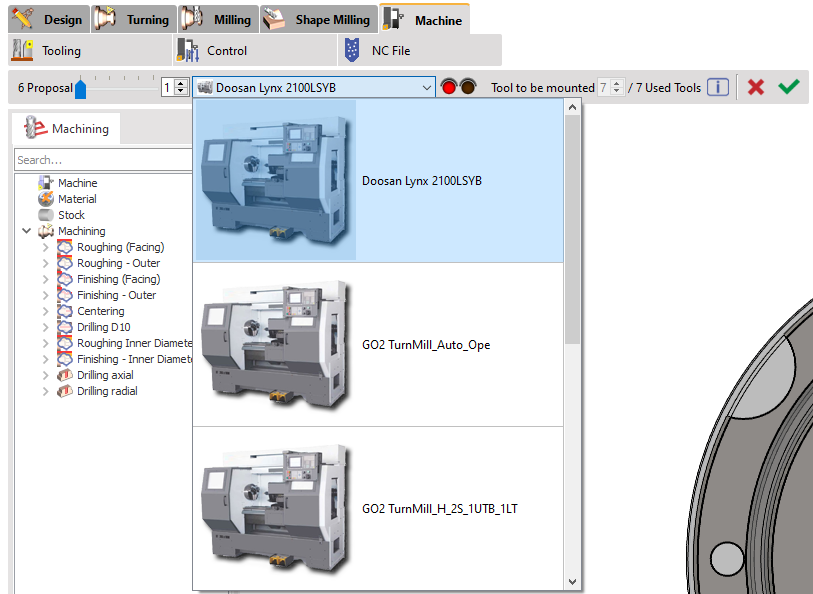
|
Rules for the Preselection of Machines
-
WanaGO scans the machine directory for compatible options based on machining type (turning or milling), spindle usage and axis requirements.
-
it compares part tools to the machine's fixed tools, identifying exact matches and potential substitutes.
-
it also selects machines based on stock dimensions, ensuring only machines that match the current stock are displayed.
In essence, WanaGO simplifies machine selection by assessing both machine capabilities and tool availability.
Prerequisite Rule for the Tools
|
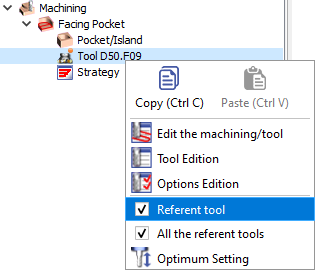
To compare the tools used for programming and the fixed tools of the machine, we first need to declare the tools as 'Referent tool' Right-click on the tool to accede to the option. When done, the tool is highlighted with an orange icon. |
|

Once WanaGO command is ran, you can click the information icon and get the following dialog: |
|
|
The information given here is that the tool ‘Tool D50’ used for programming dcan be replaced by a similar tool mounted on the machine1 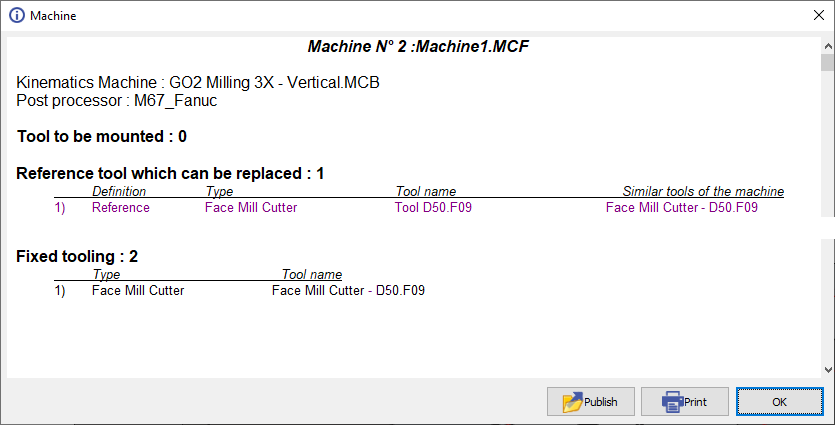
|
|
Special Rule for the Machines
|
This video shows a complete process using WanaGO.
Also, it explains how you can define sorting rules according to the machine capabilities; maximum stock size can be added in the machine file. Those information will be used during the wanaGO comparison process.
|

|