Presentation

|
This function allows you to create radial cylinders. The corresponding radial plane is automatically created. |
To create a radial hole plane
-
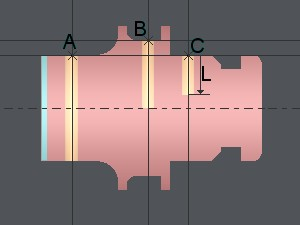
A hole is defined from a point placed on your 2D geometry. You first have to create it, you can use Line function to generate intersection points like showed in the following example with A, B and C points.
-
Fill the parameters A and D.
-
Choose the type of depth in the pull down menu :
-
Open : the hole is opened, no matter its depth.
-
Axis : the hole stops on Z axis.
-
Depth : the hole has a depth defined with parameter L value
-
-
If you choose Depth fill the parameter L.
-
Click on a point defined beforehand.