

|
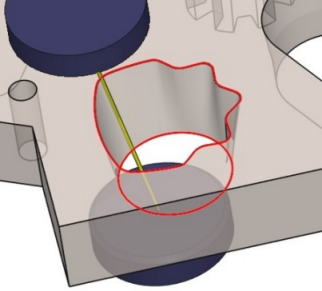
4 axes toolpath calculated between 2 profiles of any shape. The toolpath is adapted on top and bottom profiles according to the length of each profile. |
Key Points
|
To program a 4 axis cut, we first need to define the 4 axis profile in the design environment. After this, we can apply the 4 axis contour / contour cycle. |
|
|
▶️ This video shows and explains the colors used for the 4 axes toolpaths: 
|

|
Strategy Parameters
|
Dialog Area |
Parameters |
|
|
Toolpath |
Mode |
Stop length |
|
Offset type |
Stop number |
|
|
Part position |
|
|
|
Corners |
||
Movement Parameters
|
Dialog Area |
Parameters |
|
|
Approach / Return |
|
|
|
Lead in and Lead out |
||
Technology Parameters
|
Dialog Area |
Parameters |
|
|
Cutting Conditions |
Feed rate |
Number of angle register |
|
Offset number |
||
|
Setting number |
Offset |
|
|
|
Quality |
|
|
User Fields |
Machine quality |
Comment |
|
Control Device |
Machining Set |
|
Options Parameters
|
Dialog Area |
Parameters |
|
|
Options |
Height of plane |
Segmentation |
|
Upper guide height |
Material height |
|
|
Lower guide height |
|
|
|
Curves Computing |
Curve Tolerance |
Explode curve in |