
Introduction
Use Bottom Face to create a pocket from a flat bottom face on a solid model. GO2cam automatically creates the pocket boundary and recognizes its islands. The bottom altitude is read from the selected face, while the start altitude is determined from the stock. Check the generated boundary, islands and altitudes before programming the machining cycle.
Characteristics
1. Bottom radius:
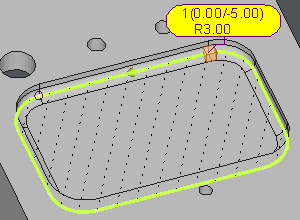
As with other profile types, if there is a radius on the bottom of the pocket, the profile is created shifted from the radius value.
A symbol indicates the presence of a radius on the bottom and the value is displayed in the label.
The bottom radius may serve solely as a visual feature without any mechanical function. To exclude it from machining, the Reading on Solid option must be set to No in the Options page of each cycle. If set to Yes, the cycle will machine the radius while maintaining the crest value specified in the Options page.
2. Open pockets:
This profile recognizes if a side is open or closed.
The color convention is:
-
clear green: closed element
-
dark red: open element
The cycle will take this information into account, overcutting according to the value given in the strategy page.
3. Islands:
They are automatically created at the right altitude.
Advice:
This type of profile has to be used for pockets with a selectable flat bottom, unlike other profiles that are very efficient for facing and open areas.
It is not the best way to machine pockets with many Z levels and subpockets, but it is very efficient when there are many islands to avoid.
Methodology
-
Open the selection modes, then choose Bottom Face
-
Click the flat bottom face of the pocket to machine
-
Check the pocket boundary, open sides and recognized islands. Check and adjust the start and bottom altitudes before programming the cycle
Examples
|
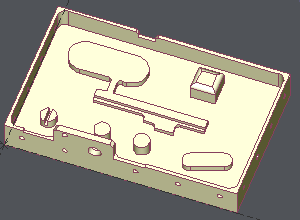
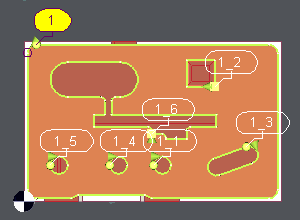
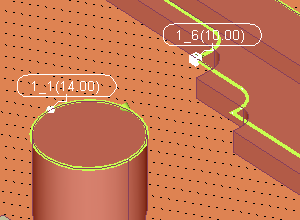
Pocket with many islands at different altitudes By clicking the bottom face, the profile 1 is created and 6 islands are recognized. The altitudes of the islands are automatically read on the solid. As shown on the 3rd image, if an island has two different altitudes, the highest is taken to leave some material for finishing. |
|
|
|
|
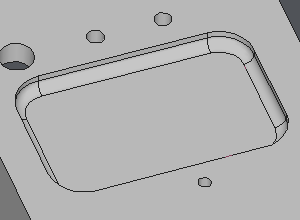
Pocket with a radius on the bottom On the right, the symbol indicating a bottom radius can be observed, with its corresponding value displayed on the label. The profile is shifted from the bottom face with the value of the radius. |
|
|
|