
Definition
Options for machining environment, toolpath calculation, and collision management.
|
Six sections:
|
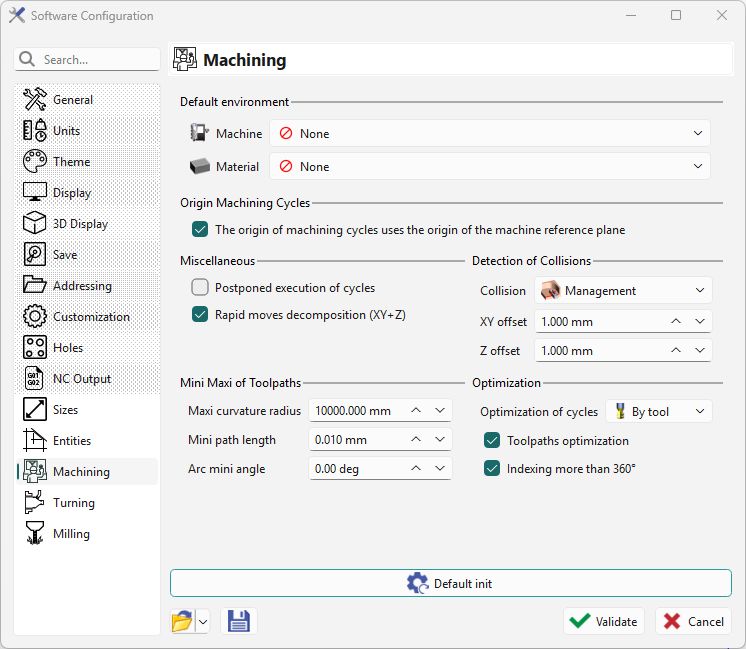
|
Default Environment
-
Machine: select a machine file to load at startup.
-
Material: select a material file similarly.
Machining Planes
-
Creation of machining planes: when checked, selecting a non-reference plane creates and shows a machining plane in the Toolbar.
-
Origin of machining planes on machine reference plane origin: the machining origin aligns with the reference plane origin when checked.
Miscellaneous
-
Postponed execution of cycles: create cycles without calculating the toolpath (3D machining).
-
Rapid moves decomposition (XY+Z): calculate rapid movements in XY then Z or XYZ.
-
Deletion of TOGO processes history: prevents editing the process (only unitary cycles remain editable).
Detection of Collisions
Three collision management parameters apply to all machining cycles. These define the default settings for each cycle.
Mini Maxi of Toolpaths
-
Maxi curvature radius: maximum arc used when decomposing a curve into arcs.
-
Mini path length: minimum toolpath length supported by your machine.
-
Arc mini angle: minimum angle (degrees) to convert an arc into a segment on Part Toolpath.
Optimization
-
Optimization of cycles: sets default command optimization options.
-
Toolpath optimization
-
Indexing more than 360°: used for continuous operations.