
Definition
Options regarding the NC file output are defined in this page.
|
We have two sections on this page:
|
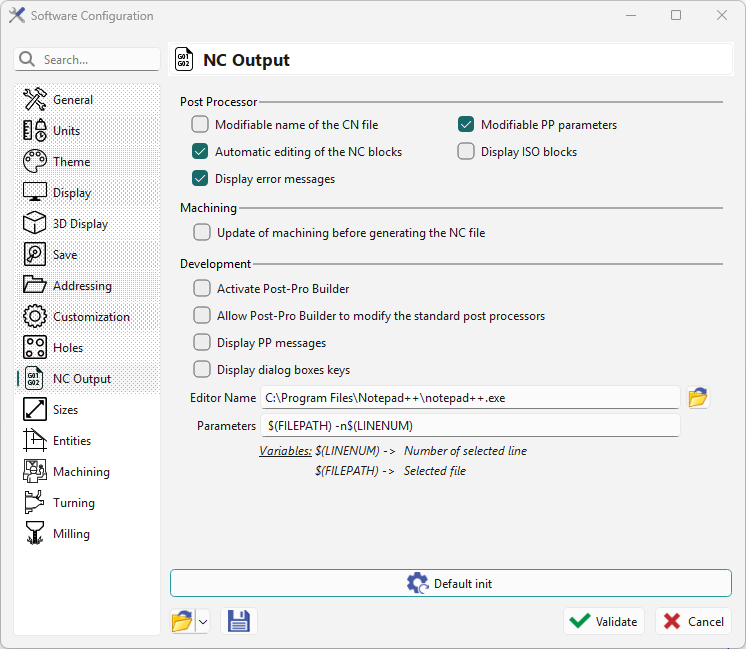
|
Post Processor
|
Option |
Description |
|
Modifiable name of the CN file |
When generating an NC file, a dialog opens to name the program and choose its save directory. |
|
Modifiable PP parameters |
Access the parameters page before post-processing (also called alpha page). |
|
Automatic editing of the NC block |
Check to display the NC file on screen after generation. |
|
Display ISO blocks |
Check to show the program on screen as it generates. |
|
Display error messages |
Check to display post-processor error messages |
Machining
-
Update of machining before generating the NC file: we launch an update of calculation before generating NC file, if the part has been modified.
It is useful to avoid any mistake and ensure that the NC file generated takes into consideration all the modifications done in the workpiece programming.
Development
|
Option |
Description |
|
Activate Post-Pro Builder |
Enables the Post-Pro Builder features for development and testing. |
|
Allow Post-Pro Builder to modify the standard post processors |
Permits sandbox changes to built-in post processors without affecting production behavior. |
|
Display PP messages |
Show informational messages produced during post-processing. |
|
Display dialog boxes keys |
Show shortcut/key prompts for Post-Pro dialog boxes (developer mode). |
|
Editor Name |
Specifies the external text editor used to open generated NC files. |
|
Parameters |
Additional options passed to the editor or post-processor during development. |