
Presentation
Definition: list of all the combinations and shortcuts available in the editor:
Keyboard
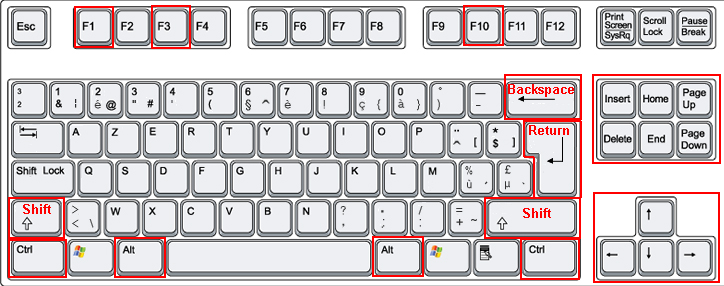
The useful keys are pointed out on this image.
|
Right Arrow |
To move the cursor one character on the right |
|
Left Arrow |
To move the cursor one character on the Left |
|
Up Arrow |
To move the cursor one line above |
|
Down Arrow |
To move the cursor one line below |
|
PgUp |
To move the cursor one page above |
|
PgDown |
To move the cursor one page below |
|
Home |
To move the cursor at the beginning of the line |
|
End |
To move the cursor at the end of the line |
|
Insert |
To switch between Insert / Replace |
|
Delete |
To delete the character on the right of the cursor |
|
Backspace |
To delete the character on the left of the cursor |
|
Return/Enter |
Insertion of a line at the location of the cursor |
|
CTRL Right Arrow |
To move the cursor one word on the right |
|
CTRL Left Arrow |
To move the cursor one word on the left |
|
CTRL Home |
To move the cursor at the beginning of the file |
|
CTRL End |
To move the cursor at the end of the file |
|
CTRL Delete |
To delete all the characters of the line located on the right of the cursor |
|
CTRL Backspace |
To delete the word located on the left of the cursor |
|
SHIFT Right Arrow |
To select the character on the right of the cursor |
|
SHIFT Left Arrow |
To select the character on the left of the cursor |
|
SHIFT Home |
To select the characters from the start of the line to the cursor |
|
SHIFT End |
To select the characters from the cursor to the end of the line |
|
SHIFT CTRL Right Arrow |
To select the word on the right of the cursor |
|
SHIFT CTRL Left Arrow |
To select the word on the left of the cursor |
|
SHIFT CTRL Up Arrow |
To select the line above the cursor |
|
SHIFT CTRL Down Arrow |
To select the line below the cursor |
|
SHIFT CTRL Home |
To select the characters the start of the file to the cursor |
|
SHIFT CTRL End |
To select the characters from the cursor to the end of the file |
|
CTRL 'A' |
To select all the text |
|
CTRL 'C' |
To copy |
|
CTRL 'V' |
To paste |
|
CTRL 'X' |
To cut |
|
CTRL 'Z' |
To cancel the last action |
|
CTRL 'Y' |
To 'redo' what was cancelled |
|
CTRL 'N' |
To create a new file |
|
CTRL 'O' |
To open a file |
|
CTRL 'W' |
To close the current file |
|
CTRL 'I' |
To insert a file |
|
CTRL 'S' |
To save the current text |
|
CTRL 'P' |
To print the current text |
|
CTRL 'F' |
To launch the search function |
|
CTRL 'H' |
To replace |
|
CTRL 'G' |
To reach a line |
|
CTRL TAB |
To edit the next file |
|
SHIFT CTRL TAB |
To edit the previous file |
|
CTRL 'Number Pad 5' |
To select all the text |
|
SHIFT CTRL 'A' |
To put all the selection in capital letters |
|
F1 |
Online Help |
|
F3 |
To continue the search |
|
F10 |
To activate the options of the menu bar. - The arrows Right/Left/Up/Down enable to navigate in the menus and submenus - Esc: to qui a menu level - enter: to validate the item of the menu |
|
ALT 0x0aaa |
ASCII character (example: if aaa is 065, character is 'A') |
Mouse
|
Right Click |
Contextual popup |
|
Left Click |
To position the cursor where you click |
|
Left Click and Hold + Move |
To make a selection |
|
Left Click and Hold on selection + Move |
To drag the selection |
|
Release the Left Click |
To drop the selection |
|
Wheel |
PgUp / PgDown |
|
CTRL + Wheel |
Zoom on the text |
|
Right Click on the VSCROLL |
Contextual popup of the scroll |
Menus
|
ALT |
To display an underlined letter under each item of the menu bar |
|
ALT + letter |
To select the menu corresponding to the letter |
|
ALT + letter |
To launch the function corresponding to the letter |
|
ALT + F4 |
To quit the editor |