
Presentation
You can accede to many complementary functions useful for machining.
To accede to these functions, right-click on the Machining line of the Machining Tree :
|
Milling Dialog |
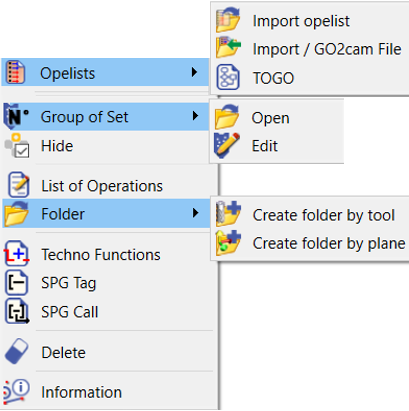
|
|
Turning Dialog |
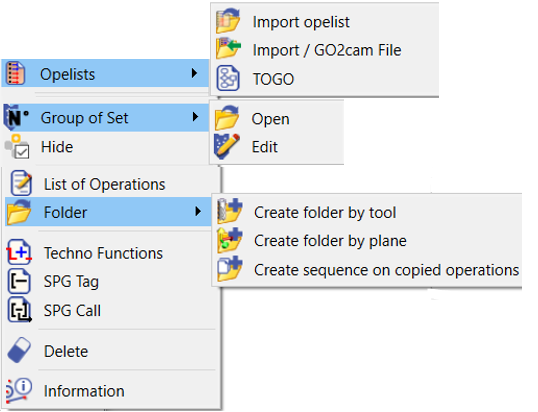
|
|
EDM Dialog |
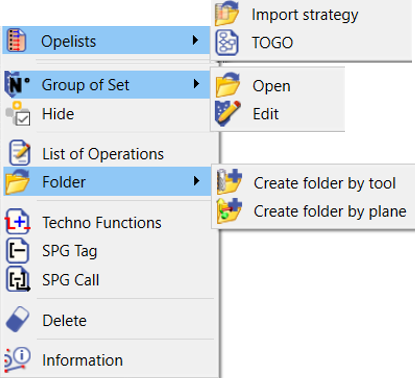
|
Options
Common Options
|
Opelist Import (Import Strategy) |
Loading an operation list... please read the corresponding chapter |
|
TOGO |
To accede to the TOGO processes |
|
Hide |
You can hide all the machining cycles at once. For the same action, you can also press the third button of the mouse (wheel). |
|
List of operations |
You can accede to several lists of operation and their specific functions : Simple, Techno, Tool, Time, Synchro (Turning only). New in v6: you can edit these list of operations under several formats. Click the button Export, and choose the type of format: *.csv, *.txt or *.pdf. |
|
Techno Functions |
These functions are considered as operations in the tree ; you can add stop, coolant and specific operations etc. |
|
SPG Tag and SPG Call |
Creation of sub-programs treated by the post-processor |
|
Delete |
Deletion of all the operations defined |
|
Information |
Machining time of the whole part calculated regarding the cutting conditions |
|
▶️ You can watch a video on how to search in the list of operations:
|