
Definition
Miscellaneous options about entities calculation and display.
|
These sections are on the entities page:
|
|
|
Commands |
Explanation |
|
|
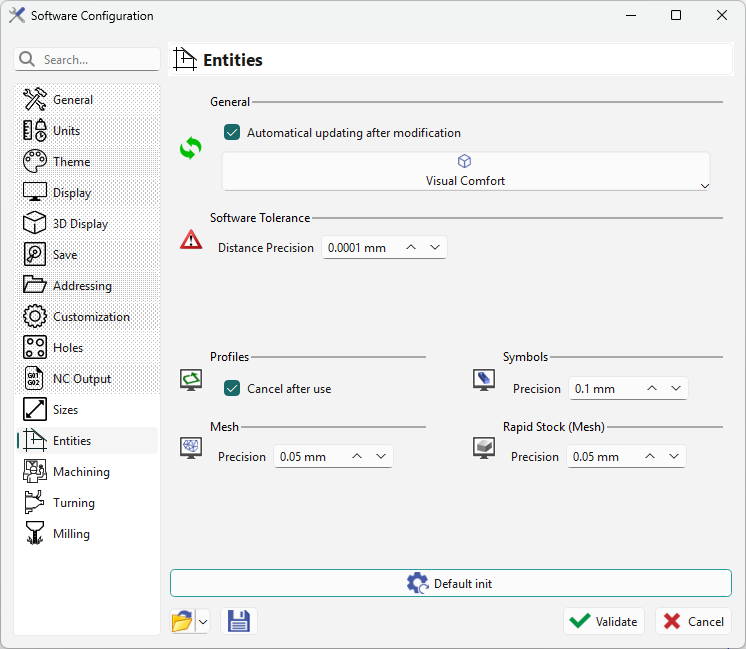
Automatical updating after modification: |
Calculation launches automatically after each change. For 3D calculations or multiple consecutive changes, uncheck this option and update manually after all changes. |
|
|
Distance precision |
This tolerance affects all geometry and machining calculations. The default value is 0.0001 mm and should change only for geometric design errors. |
|
|
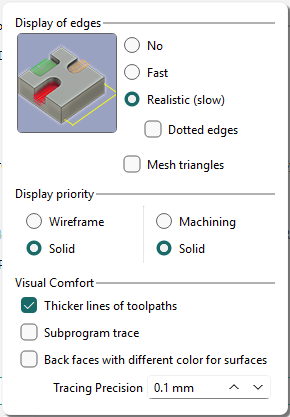
Visual Comfort |
Allows you to modify parameters related to the display in the software. For more information: Display Options
The values defined in this dialog are not saved in the *.ini file of options. These values are saved into the PCE file, they are reset while opening a .PCE file; they cannot be saved as default settings. |
|
|
Icon |
Command |
Explanation |

|
Profiles |
The Cancel after use option is checked when profiles are not retained after use. It should not be set OFF in Wire EDM. |

|
Symbols |
This controls the tessellation precision for symbol display. |

|
Mesh |
This controls the tessellation precision for Mesh design display. |

|
Rapid Stock(Mesh) |
This controls the tessellation precision for stock display. Only when Solid Stock Calculation is set to Rapid Stock |
Tessellation tolerances below 0.1 offer greater precision but reduce speed.