
Presentation
dataGO is an optional module that provides a direct interface with several CAD systems. Its primary purpose is to maintain associativity between GO2cam and the original CAD files.
dataGO replaces FTE file import. The CAD software plug-in used to export FTE files is no longer provided. However, compatibility is maintained: *.FTE files can still be imported in GO2cam V6.11.
Supported CAD Software
dataGO provides a direct link between GO2cam and the following five CAD systems:
-
CATIA V5
-
Creo
-
NX
-
SolidWorks
-
SpaceClaim
Associativity
Overview
With dataGO, GO2cam keeps a live link to the original CAD model throughout the machining workflow.
When the CAD model changes
If the CAD model is modified after machining has been programmed in GO2cam, use Part Update to bring those changes into the CAM project.
How to update the part
-
Open the Edit menu.
-
Select Part Update.
-
Select the part to update.
-
Confirm the update when GO2cam prompts you to apply the detected modifications.
Machining operation updates
When the position or size of a hole changes, GO2cam can also update the related machining operations.

|
Part Update |
Dialog interaction
Click a line in the dialog to highlight the corresponding holes and faces on the screen. Information displayed
The dialog lists the detected changes:
Automatic hole calculation
You can run the automatic hole calculation when holes have already been computed. If they have not been computed yet, the option is greyed out. 
|
|
|
Here, we import the original file.
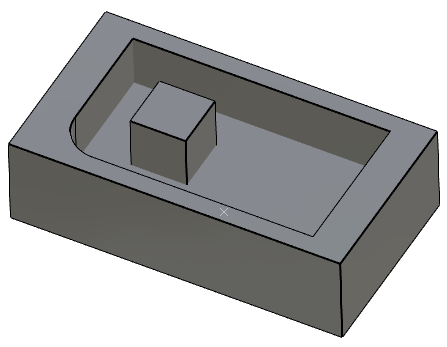
|
We run the ‘Part Update’: the dialog gives us the list of changes 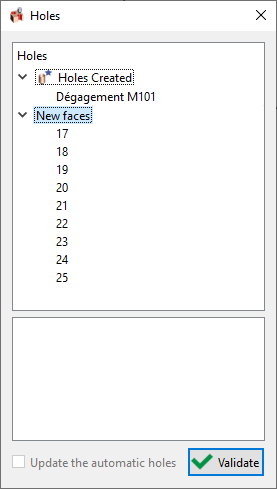
|
When you click a line in the dialog, the modifications are highlighted in the screen. 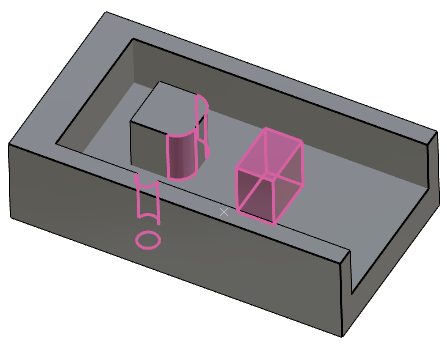
|
|
▶️ You can watch a video about the dataGO Part Update:
|
|