
Presentation
|
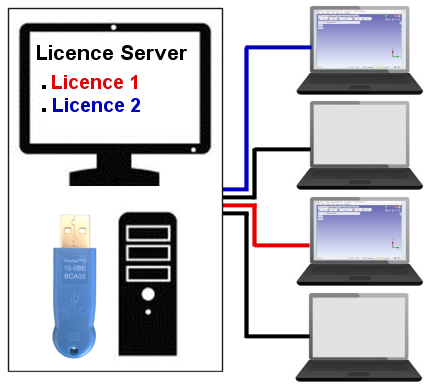
This system called ‘Floating licences’ offers a certain number of licences shared by a larger amount of users. When an authorized user wants to run the software, he requests the licence from a central licence server. If a licence is available, the server allows GO2cam to run. When the user stops using the software, he gives back the licence.
Here, 2 licences red and blue can be used on 4 different computers. |
|
Terminology for computers:
-
Licence Server: centralized computer software system which provides access licences to client computers in order to enable GO2cam to run on them. We will call him ‘Server’ in the next pages.
-
Client computers: PCs that get licence from the server. This is where is installed and used GO2cam. We will call them ‘Clients’.
Terminology for files:
-
Licence file: this *.LIC file defines GO2cam’s configuration (modules and options). It is located in the Server. We will call him ‘Licence file’.
-
Server Config file: this file, present in the clients computers, informs about the IP address of the server to allow communication. It can be *.LAN or *.WAN file but we will simply call him ‘LAN file'.
Types of System
Two systems are possible:
-
Floating licences on a local network: the server distributes the licences over a local network, such as a VPN. The files for the connection between clients and server is a *.lan file (LAN stands for Local Area Network).
-
Floating licences on the internet: the server distributes the licences over the internet. The file is a *.wan file (WAN stands for Wide Area Network).
Process for Floating licences
Follow carefully the steps to install the server, configure the communication ports and define the files:
-
Install GO2cam on the authorized client PCs: Installation Procedure
-
For licences on local network, install and configure the server: Installation of Floating Licences Server
-
Use and manage clients' licences: Manage and Configure Licences
-
Recover user’s data: Import from Another Version