

|
The material file (*.MTR) is linked to tables (*.csv) which enable you to calculate cutting conditions automatically. These cutting conditions are called in the technology page of the cycles with the icon. |
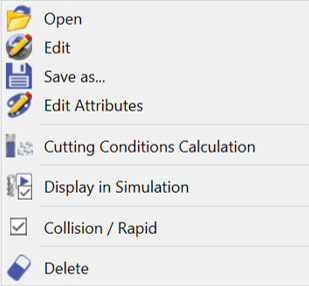
The functions relative to the material and the cutting conditions are available in the machining tree; do a right-click on Material:
|
Open |
Loading of a material file via the Windows explorer (Mat folder) |
|
|
Edit |
Opening the material file to create or modify the characteristics of a material and accede to the cutting conditions editor |
|
|
Save as... |
You can register the material file |
|
|
Attributes Edition |
Enables to modify the attributes of the solid |
|
|
Cutting Conditions Calculation |
Click the button to re-calculate all the cutting conditions according to the modifications done in the material file. |
|
|
Solid Conversion |
You can convert the solid for machining and apply shape cycles directly on the solid. |
|
|
Display in Simulation |
Ability to choose to display the solid during the simulation or not. |
|
|
Collision / Rapid |
Management of the collisions between the part and rapid path (calculation may be slower) |
|
|
Transparency |
Checking this box makes the solid part become transparent |
|
|
Hide |
Checking this box hides the solid part |
|
|
Delete |
Cancellation of the material chosen |