
Preferences

|
Change the language, the units, the numerical system, the addressing. Click on the icon in the Homepage. |
Configuration
|
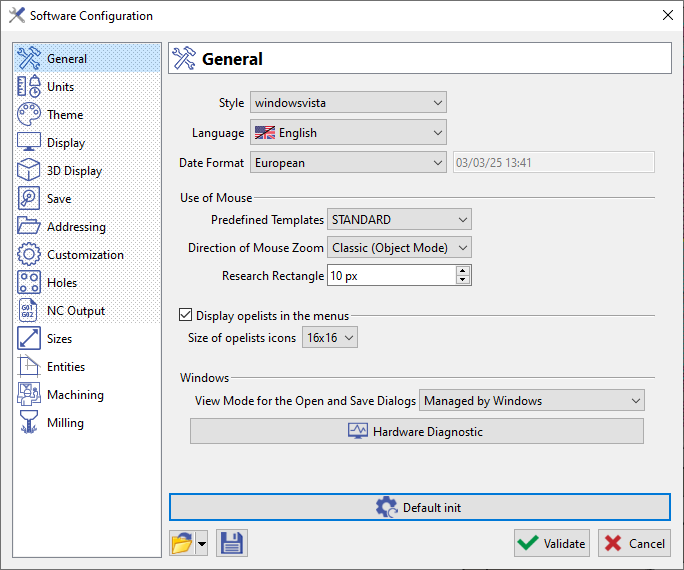
Go to the menu Tools / Options:
|
|
Input Values
|
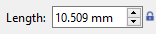
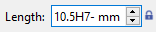
In the dialog zone and in any dialog box, you can enter into a field: |
||
|

|
|
|

|
|
|
|

|
|

|

|
|

|

|
Mouse Manipulations
The mouse configurations templates is accessible through Tools>Options, in the General window. The default configuration (STANDARD), including associated shortcuts, are that of SolidWorks.
GO2cam configuration can be set by selecting the option 'GO2cam Legacy', accessible in the drop-down list of the Predefined Templates. The shortcuts for the template are as per below:
GO2cam Legacy

|
Zoom: Press scroll button of the mouse. Move the scroll in 2 directions to zoom in and zoom out. |

|
Rotation: Press scroll button of the mouse or press key F7. Press and maintain the Left Button of the mouse and move the mouse. |

|
Translation: Press scroll button of the mouse or press key F7. Press and maintain the Right Button of the mouse and move the mouse. |
Customize the User Interface
|
In Tools menu: creation of specific toolbar by user ( Customize Toolbar), Customize Menus and Customize list of operations. |
|
Creation of views and zoom levels in the menu Display>Users Views. |
|
Display Options: Precision and Display priorities in the Status bar (bottom right-hand corner) |
Keyboard Shortcuts
|
Inversion of view |
V key (in all the menus and in simulation), |
|
Contextual Cursor |
Ctrl + Shift + click on the element to snap to the middle of a segment or to the centre of circle and arc |
|
Edit element |
Double-click any type of element |
|
Call the Grid |
CTRL key while using the geometry commands |
|
Selection of face |
SHIFT key to make easier the click on a face |
Shortcuts for the commands in menus
|
Menu File |
|
|
New |
Ctrl + N |
|
Open |
Ctrl + O |
|
Save |
Ctrl + S |
|
Save As… |
Ctrl + Alt +S |
|
Save Temporary File |
Ctrl + G |
|
|
Ctrl + P |
|
Back to the Workshop |
Ctrl + Q |
|
Menu Edit |
|
|
Undo |
Ctrl + Z |
|
Select All |
Ctrl + A |
|
Undo Selection |
Ctrl + W |
|
Cancel all filters |
Ctrl + R |
|
Edit Element |
Ctrl + H |
|
Edit Attributes |
Ctrl + T |
|
Cut Geometry |
Ctrl + X |
|
Copy Geometry |
Ctrl + C |
|
Paste Geometry |
Ctrl + V |
|
Menu Display |
|
|
Hidden Lines |
F10 |
|
Solids with Wireframe |
F11 |
|
Tools Visibility |
F6 |
|
Dynamic Rotation |
F7 |
|
Zoom |
Ctrl + J |
|
List of Views |
F8 |
|
Change of View |
F5 |
|
Menu Help |
|
|
Help File |
F1 |
|
File Info |
Ctrl + I |
|
Menu Tools |
|
|
Calculator |
Ctrl + K |