

|
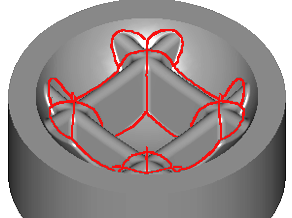
The Pencil Milling is a 3D contouring which removes material along the bi-tangency areas, that is to say the areas with multiple contacts between the tool and the part. |
Key Points
|
|
Strategy Parameters
|
Dialog Area |
Parameters |
|
|
Definition of Machining Area |
Horizontal machining mode |
Vertical machining mode |
|
Mini vertical angle |
Maxi vertical angle |
|
|
Toolpath Strategy |
Tolerance of angle |
Mini length of the path |
|
Allowances |
XY Stock allowance |
Z Stock allowance |
|
Normal stock allowance |
|
|
Movement Parameters
|
Dialog Area |
Parameters |
|
|
Safety (in Z) |
Rapid plane alt. |
Safety distance |
|
Approach and return in Z |
Retract altitude |
|
|
Leadin and leadout in XY |
Lead in length |
Lead out length |
|
Lead in arc radius |
Lead out arc radius |
|
|
Leadin radius angle |
Leadout radius angle |
|
Technology Parameters
|
Dialog Area |
Parameters |
|
|
Cutting Conditions |
Quality |
Cutting Speed |
|
Feedrate/tooth |
Spindle direction |
|
|
Spindle speed |
Feedrate |
|
|
Sp. speed range |
||
|
Tool Numbering |
Tool number |
Specific Number |
|
Length compensation number |
Diameter compens. Nb |
|
|
Users Fields |
Comment |
Control Device |
|
Milling Set |

|
|
Options Parameters
|
Dialog Area |
Parameters |
|
|
Behaviour on the clamps and components |
Gouge Check |
Offset XY |
|
Safety area |
Offset Z |
|
|
Curves Computing |
Curve tolerance |
Curve segmentation |