Access
|
In GO2cam, we use different lists of tools, defined in the Machine File:
We can accede to these lists from the Machine file, or directly in the Machining tree: |
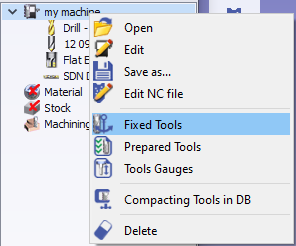
|
Definitions
-
Fixed tools are always mounted in the machine, with their given number.
-
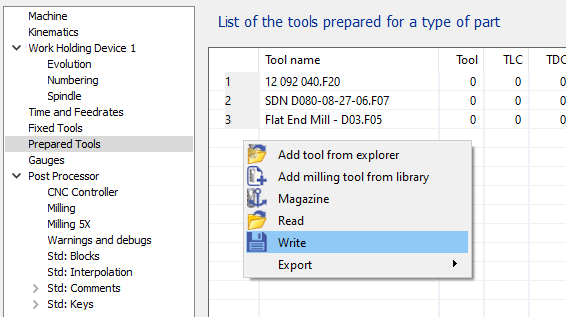
Prepared tools are the tools that we prepare for the current part manufacturing. We define a list of tools to be used.
-
Choose the tools by right-click
-
Delete the tools by selecting the tool in the table and then use ‘Del’ key.
Compared to the fixed tools, this list can be saved (*.OUT) and used later for another workpiece (Write and Read functions)
Link with Tools Libraries
|
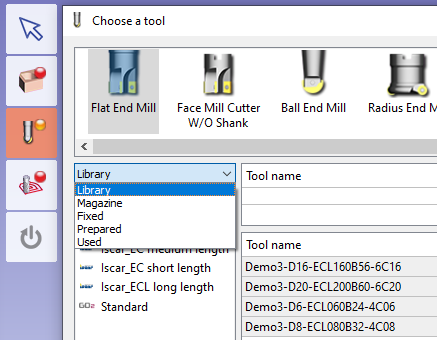
When you are in the libraries of tools, you can sort the tools by ‘database’: Usually, we work in ‘Library’, wheere you acced to all your downloaded libraries. But you can also choose :
|
|
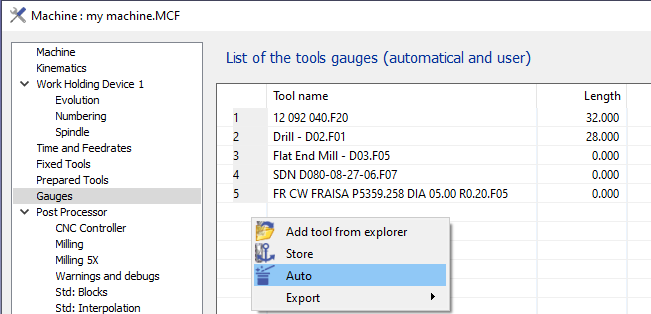
Tools Gauges
Here you define the useful length for each of the fixed or prepared or other tool.
With a right-click then ‘Auto’, you load the list of tools from Fixed and Prepared lists and you can adjust their useful lengths.