

|
Creation of helix geometry. The entity created is a single curve. |
Creation of Helix
Create dynamically by clicking 3 points:
-
The first point is the center of the helix. Click on the screen or enter coordinates in the dialog.
-
The second point sets the helix entry point.
-
The third point sets the radius. You can also define this value in the dialog.
|
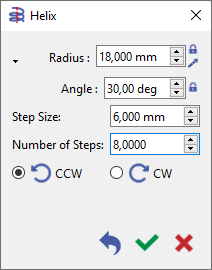
Then define the helix characteristics in the dialogue:
Switch to Diameter with the small black triangle. |
|
|
Application
This helix is useful in these cases:
-
It can be the backbone for solid design (e.g., extrude along path)
-
It can be a drive profile used with 5X simultaneous operations
-
It can be selected for machining with a manual operation (contouring) but calculated in tool center (no offset)
GO2cam cannot offset a helix, either in geometry (with Parallel Profile) or in machining (contouring with compensation).