
Presentation

|
This copy function is completely dedicated to machining cycles. You can not copy anything but cycles. |
You cannot copy cycles for which selection is done on the stock!
You cannot copy operations done in developed plane!
To copy a cycle
1/ Selection : you can choose the cycle(s) in the machining tree or by clicking on the toolpath. Select several cycles with the Ctrl key. Do a right-click to confirm.
2/ Repeat Mode : if you copy several cycles, the copy can be done in 2 modes :
|
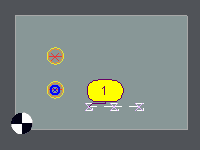
By group : the cycles are not mixed.
It behaves as a kind of optimization by shape. |
If you copy 2 times the cycles : centering-drilling-tapping, you will get : 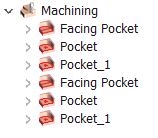
|
|
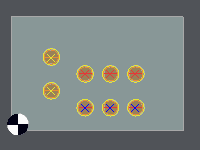
By cycle : the cycles are copied cycle by cycle.
It behaves as a kind of optimization by tool. |
If you copy 2 times the cycles : centering-drilling-tapping, you will get : 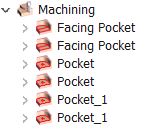
|
3/ Type of copy : several types are available:
-
Translation: define the number of copies and the vector of translation
-
Symmetry: define the axis of symmetry by clicking the button 'Axis' and then clicking a line or by defining the coordinates of a point and an angle. The symmetry respects the direction of machining (G41-G42).
-
Rotation: define the number of copies and the center of rotation by its coordinates or by clicking the button 'Center' and then clicking a point
-
Rescale: define the number of copies, the center of manipulation and the proportion factor.
-
Repeat/Points: the aim is to repeat the cycles selected on a cloud or a grid of points.
You can optimize the path between the selected points with the 2 functions:

|
Choice among several types of path optimizations |

|
Choice of the origin of the optimization. |
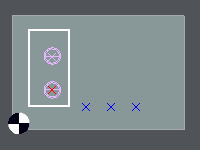
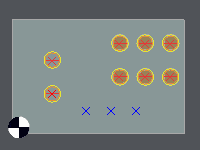
There are 2 ways to proceed:
|
1. Select the cycle (selection box) |
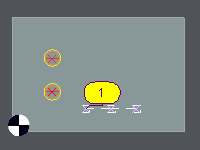
2. Click the button 'Selection' ; show the origin points of the copied cycles. |
3. The cycles are created. |
|
|
|
|
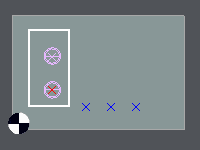
1. Select the cycle (selection box) |
2. Click the button 'Selection' ; show the points. Click 
to declare a new origin of transfer. In this case, I show the blue point. |
3. The cycles are created. |
|
|
|