
|
In 3X Milling, how to avoid the tool to plunge into holes or cavities?
|
||
|
We can consider 2 methods, mostly useful for 2 types of cavity (holes or pockets) |
||


|
Holes Recognition or Solid Analysis You can use any of those commands to create stop faces automatically on the recognised holes. Commands located in Design>Solid>Features |

|

|
Stop Faces This method is manual since you need to clog a hole or a cavity one by one. But this method works on absolutely any shape that needs to be covered. Command located in Design>Solid>Faces |
|
|
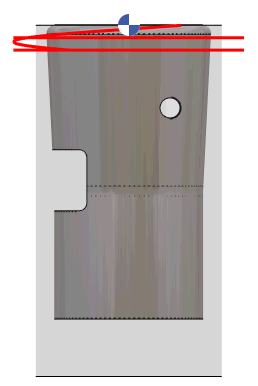
The Finishing cycle (or Z level) does not operate to the selected bottom altitude! Why? and how to fix it?
|
|
|
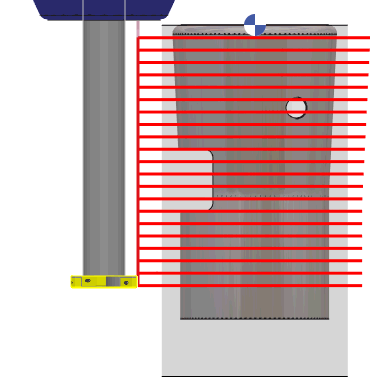
The workpiece being machined has an undercut angle, and this is the reason why the machining do not go to the bottom altitude. A rough/rework operation in the same situation would go down; but the finishing and the Z level cycles are used to finish the workpiece; their algorithm is optimized, the toolpaths stay closer to the worpiece and avoid air cutting. Of course, there is one option to machine undercut areas; you can set it ON and get this result on the right. |
|
|
As a conclusion, if the part has an undercut shape, the finishing and Z level operations cannot machine it as a ‘cylinder’. Either you use a rough/rework operation, or you set undercut machining to Yes. Download the workpiece: Finishing.PCE |
|