
Definition
Many options regarding machining environement, toolpaths calculation and management of collisions.
|
6 sections are given:
|
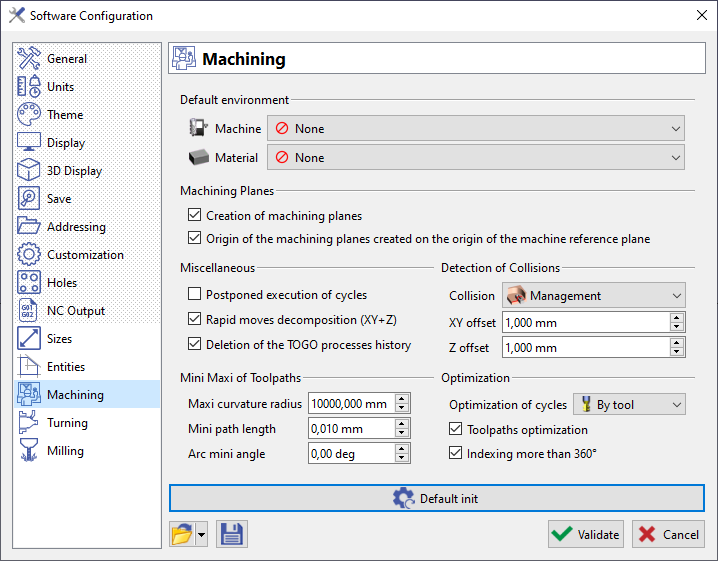
|
Default Environment
-
Machine: choose a machine file that will be loaded automatically when starting the software.
-
Material: same for a material file.
Machining Planes
-
Creation of machining planes: if this option is checked, if ever a plane other than reference is selected, a machining plane for that specific plane will be created and shown in the Toolbar.
-
Origin of the mahcining planes created on the origin of the machine reference plane: the origin of the machining is always set in the reference plan, if this option is checked
Miscellaneous
-
Postponed execution of cycles: create cycles without calculating the toolpath (3D machining)
-
Rapid moves decomposition (XY+Z): rapid movements calculation in XY then Z or XYZ.
-
Deletion of the TOGO processes history: impossible to edit the process (but the unitary cycles).
Detection of Collisions
The 3 parameters regarding the management of collisions are common to all the machining cycles in the software: here we define the default settings that will appear in each machining cycle.
Mini Maxi of Toolpaths
-
Maxi curvature radius: maxi arc available during the decomposition of a curve into an arc.
-
Mini path length: define the mini length of toolpath supported by your machine.
-
Arc mini angle: mini angle (degrees) to change an arc into a segment on Part Toolpath.
Optimization
-
Optimization of cycles: the choice done here will be the default settings in the command optimization.
-
Toolpath optimization:
-
Indexing more than 360°: used for continuous operations.