

|
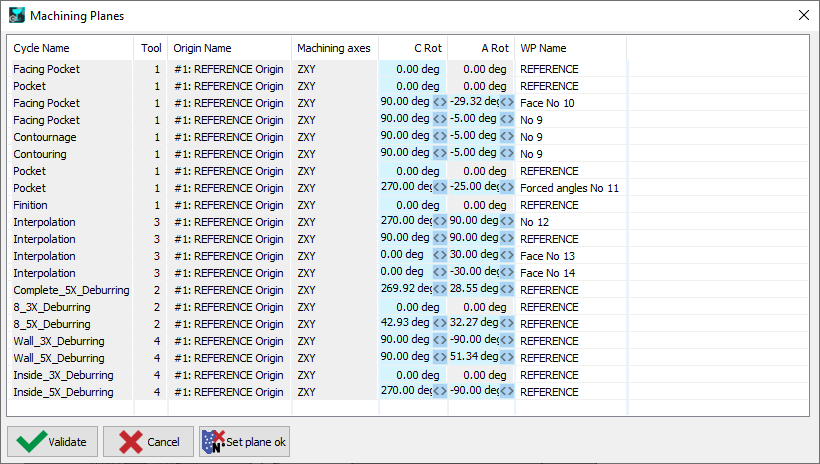
The Machining Workplane feature verifies the compatibility of your machine's axes and spindles with the defined workplane. This function displays information about the workplane, including editable (blue) and non-editable (grey) parameters. An accompanying icon indicates the availability of additional options. Red boxes highlight potential issues with the workplane setup or the selected tool. |
|

|

|
Unreachable angles Since years, unreachable angles are displayed in red in the list of workplanes: we have added a warning for these unreachable angles. 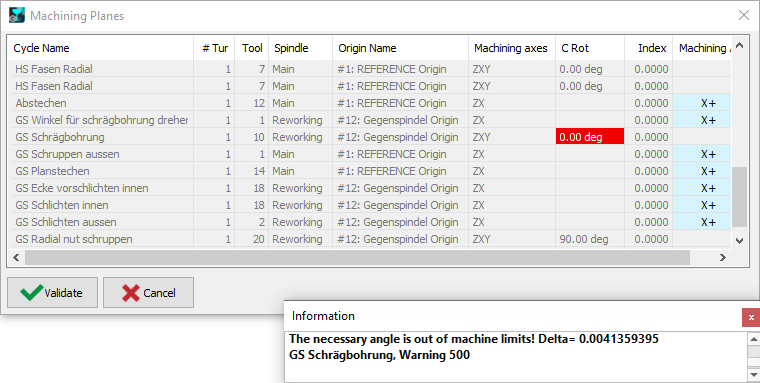
This warning gives you the delta angle value that must be set in the tool to allow the machining. The values can be copied in the dialogue and set in the tool position settings. |

|