
Presentation
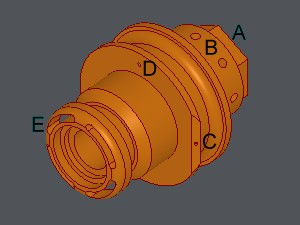
The menu Part Design enables you to program milling operations on a lathe center with C, B and Y axes. We also call it Rotating Tools. The functions of the menu are a preparatory step to the machining.
Principle
|
The functions of the rotating tools can be used only on a solid. You are suggested to use the Revolution function to create a solid from shaft geometry. 
The Part Design functions have several purposes:
|
|
List of the functions
1. Functions dedicated to Y axis (or C) operations:

|
Predefined Shapes (Y or C axis machining) |

|
|

|
2. Functions dedicated to B axis operations:


3. Regarding axial operations (C axis), the principle is different:

|
|

|
|
The Creation tree on the left enables to have a global visualization of the several operations done and to edit and modify geometries.
Finally, you can find some functions to create 2D geometry if needed:

|
Edges Extraction |

|
Line |
|