
Adding a File

|
The main function of the commands is to add a GO2cam File or a CAD file on the current PCE file. The main purpose is to add geometry or import a stock shape. |

|
GO2cam File |
This command imports a .PCE (GO2cam) file into the current project. When importing a PCE file:
|

|
CAD file |
This command allows to import a compatible CAD file on the current PCE file. The file is opened with the CAD standard interfaces. There is no automatic positioning, you will have to do it once the part is imported. |

|
Improvement of Add files The command ‘Add files’ now recover 5 axis expert cycles. But be careful to the axis defined in the cycle dialog, that may be changed while updating computing! |
|
Assignment of Solids

|
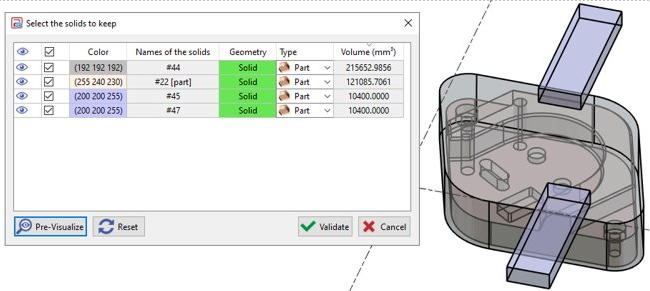
This command enables to access to the table of assignment of solids, where you decide whether a solid is the workpiece, the stock, a clamping element or something else. This table is usually accessible while importing a set of solids. This command, available from File > Add, can be useful in the following situations:
|
|
|
|
▶️ Watch a video showing the use of the Assignment of Solids. 
|
|