
Revisions are GO2cam versions mainly dedicated to fix software issues. Revisions are identified by numbers 1, 2, etc. and they are released approximatively once a month.
Minor improvements are sometimes added, they are described in this document. For the whole list of corrections, click here.
2026.10
|
Improvements |
06 October 2026 |
|
Topic |
Type |
Subject |
Explanation |
|

|
User Interface |

|
Colors |
Custom colors defined in the dialog of colors management and in Edit Attributes are now saved and recovered between GO2cam sessions. |
|
|
User Interface |
|
Customize Toolbars |
We have added Annotations, Block of Annotations and Roughness. |

|
Wireframe Geometry |
|
Measure |
In Turning, the measure now automatically displays diameters values, as previously in V6. |

|
Tooling |
|
GTC import |
Tool import with GTC format has been highly improved, especially with placement of insert on turning tools. |

|
Opelists |
|
Cutting conditions |
In cutting conditions dialogue, we have now access to the whole list of machining cycles (formerly only turning, or milling, not both) |

|
CAD Import |
|
Updates |
CAD interfaces have been updated and can now import :
|
2026.8
|
Improvements |
04 August 2026 |
|
Topic |
Type |
Subject |
Explanation |
||
|
|
User Interface |

|
Workflow |
We have added the Workflow command in the rapid access section, on top of the GO2cam window. The purpose is to be able to launch the workflow easily at any time, for instance after designing a part geometry. |
|

|
Turning |
|
Cycles Roughing and Balanced Roughing We created a new parameter to define Z safety distance in subpockets. |
|
|
2026.7
|
Improvements |
04 July 2026 |
|
Topic |
Type |
Subject |
Explanation |
|
|
|
User Interface |
|
We added the Update command to the Customize toolbar. It gives the ability to create shortcut to launch the update. |
|
|
|
Wireframe Geometry |
|
Segment |
We modified the behaviour of chaining option: From version 2026.7, chaining creation of segments is the default behaviour. Popup menu then enables to cancel the chaining and we can be back to chaining with the same popup. And also, the option chosen is now kept while being back to the Segment function. Reminder: previously, the popup menu enabled to cancel the chaining, but with no possible turning back. And the next time you came back to the segment was in Chaining option to ON. |
|
|
Machining |
|
Management of Collisions |
From 2026.1, the option to test collisions with part was set to OFF by default. This option is available in the Machining tree, in each cycle popup. We decided to name it ‘Control Collisions with Part’. |
|
|
Simulation |
|
We improved general dynamic simulation performance for eccentric turn cycles. Please note this improvement is used only with Simplified Machining option active. |
|
|
|
Turning |
|
Coolant parameter is now available in the broaching operation. |
|

|
5X Expert |
|
New behaviour for safety: if GO2cam safety plane is lower than the safety plane defined in the 5X cycle, we do not take it into account in NC file, as it is usually the case. |
|
2026.6
|
Improvements |
27 May 2026 |
|
Topic |
Type |
Subject |
Explanation |
|

|
Wire EDM |
|
Download of Wires The Wires Library Dialog gives now access to the GO2tool library, with 14 libraries available for download. This is the exact same window than in milling and turning. |
|

|
Swiss Machining / Turning |
|
New option in Form Finishing cycle We have added a new option ‘Tool Orientation’: it enables to compute a different toolpath, since we can define the projection orientation of the form tool. It enables to accede to different areas of the profile, such as undercut areas. |
|
|
|
User Interface |
|
Improvement of Add files The command ‘Add files’ now recover 5 axis expert cycles. But be careful to the axis defined in the cycle dialog, that may be changed while updating computing! |
|
|
|
Wireframe Geometry |
|
Single Stroke Font When you install a single stroke font, it is not recognized as single stroke by default. To make it possible, we added an option in the Text Command, with a checkbox that must be set ON. |
|
|
|
Tooling |
|
Tools Update Enhanced Any modification in Tool page (diameter value, coolant, specific number) generates modifications in the Technology page of cycles using the updated tool. For instance, cutting conditions are recomputed, coolant numbers are assigned, etc. |
|
|
|
Simulation |
|
Dynamic Simulation |
Form Tools We have improved the management of form tools in dynamic simulation. |
2026.5
|
Improvements |
29 April 2026 |
|
Topic |
Type |
Subject |
Explanation |
|
|
|
CAD Import |
|
We improved the assignment of names while importing several files or single file with several solids. Previously, the name of solid defined in the CAD file had priority on the file name. Now:
Also the file name will appear only in case of multiple files import; if we import a file with multiple solids, no need to repeat the file name for each solid! |
|

|
Measure |
|
Measure is now accessible with shortcut Ctrl+m |
|
|
|
Machining |
|
The sphere mode is not anymore a full sphere but an hybrid shape with a half-sphere on top and cylinder on bottom. |
|
|
|
Turning |
|
The stock is now computed for a point to point operation. |
|
2026.4
|
Improvements |
02 April 2026 |
|
Topic |
Type |
Subject |
Explanation |
Video |
|
|
|
|
Angular Holes |
Smart Turning Measure offers new information about angular holes: B and C angles values are given (in the Revolution Plane). 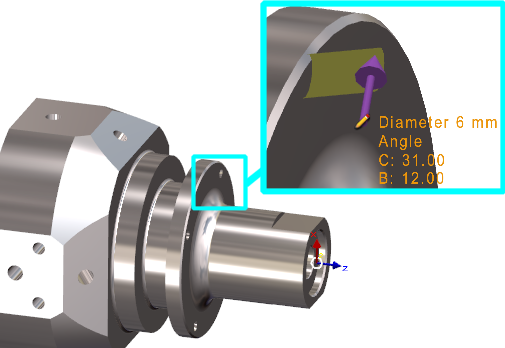
Values are also accessible and copyable in the information dialogue. |

|
|
|
|
Finish Groove |
|
Smoothing height |
New parameter Smoothing height that generates a smoother toolpath by avoiding 'subpockets' and wave-types toolpaths. |

|

|
|
Unreachable Angles |
Since years, unreachable angles are displayed in red in the list of workplanes: we have added a warning for these unreachable angles. 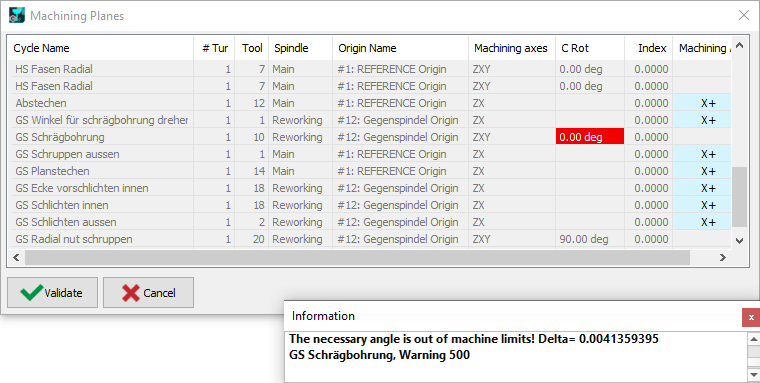
This warning gives you the delta angle value that must be set in the tool to allow the machining. The values can be copied in the dialogue and set in the tool position settings. |

|
|
|
|
CAD Import |
|
SpaceClaim |
Read of new SpaceClaim format scdox. This format is more recent and compressed than native format scdoc. |
|
2026.2
|
Improvements |
12 March 2026 |
|
Topic |
Type |
Subject |
Explanation |
Video |
|
|
|
Machining |
|
New command that enables two types of Modifications of profiles:
|

|
|
|
|
Turning |
|
In the strategy, we added a new choice for the Pilot Point: Left, Center or Right.
|
|
|

|
Milling |
|
Multi axis linking between operations Linking between 2 operations using the same tool can be realized with a 5-axis simultaneous motion. For this, define a safety area (in Stock dialogue) and choosen ‘Follow 5Xs Area’ in the cycles strategy. 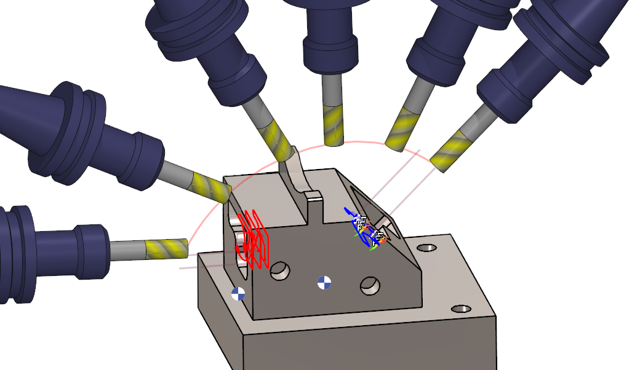
|

|
|
|
|
Opelists |
|
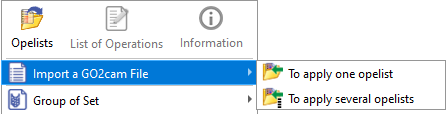
Import GO2cam File |
The command that enables to import a PCE file to transfer the machining operations into opelists has a new behaviour:
|
|

|
3X Milling |
|
Spiral |
Toolpaths computing In the page Options, we have added the ability to ‘Decompose the arcs of toolpaths’. This will generate G01 segments in NC file instead of G02/G03 arcs. |
|