

|
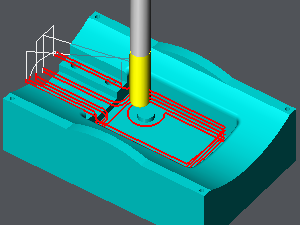
GO2cam applies automatically a 2D contouring on a 3D shape by Z increments, managing leadin and leadout motions and the tool radius compensation. |
Key Points
|
Main parameters are very close to the 2D cycles parameters.
|
|
Strategy Parameters
|
Dialog Area |
Parameters |
|
|
Toolpath and Compensation |
Toolpath |
|
|
R max coef |
Rework machining |
|
|
Limitation of Machining |
Limitation Area |
|
|
Calculation of Z Steps |
Z Step (Ap) |
|
|
Stock Calculation |
|
|
|
Allowances |
||
|
List of altitudes |
List of altitudes |
|
Movement Parameters
|
Dialog Area |
Parameters |
|
|
Safety |
||
|
Approach and return in Z |
||
|
|
||
|
Safety (in XY) |
XY safety distance |
|
|
Management of rapids |
||
|
|
||
Technology Parameters
|
Dialog Area |
Parameters |
|
|
Cutting Conditions |
Quality |
Cutting Speed |
|
Feedrate/tooth |
Spindle direction |
|
|
Level |
Spindle speed |
|
|
Feedrate |
||
|
Sp. speed range |
||
|
|
||
|
Tool Numbering |
Tool number |
Specific Number |
|
Length compensation number |
Diameter compens. Nb |
|
|
Users Fields |
Comment |
Control Device |
|
Milling Set |

|
|
Options Parameters
|
Dialog Area |
Parameters |
|
|
Behaviour on the clamps and components |
||
|
Safety area |
||
|
Curves Computing |
Curve segmentation |
|
|
Toolpath Computing |
Decomposition of arcs of toolpath |
Arcs decomposition tolerance |