

|
This cycle is special, you need first to define the taper with the specific command in design menu. |
Key Points
|
You can program tapers in contouring toolpath with compensation (G41/G42). For this, you must create the taper in geometry with the command Taper Creation. You can define constant or evolutive tapers. |
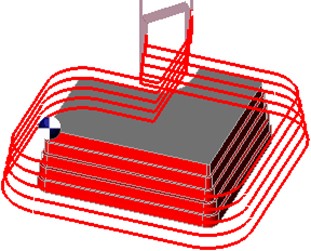
|
|

|
Taper Creation is located in Design>Taper submenu. Click here for more information! |
|
Strategy Parameters
|
Dialog Area |
Parameters |
|
|
Toolpath and Compensation |
||
|
Toolpath Strategy |
2 Ways Path |
|
|
Calculation of Z steps |
Z Step (Ap) |
|
|
Allowances |
|
|
|
Overcutting |
Manage open areas |
|
Movement Parameters
|
Dialog Area |
Parameters |
|
|
Safety (in Z) |
||
|
Approach and return in Z |
||
|
|
||
|
Motions between Z approach and XY leadin |
||
|
Leadin and Leadout in XY |
||
|
Angle/distance calculation+tool radius |
Radius calculation+tool radius |
|
|
Z plunge distance on bottom radius |
|
|
Technology Parameters
|
Dialog Area |
Parameters |
|
|
utting Conditions |
Quality |
Cutting Speed |
|
Feedrate/tooth |
Spindle direction |
|
|
Level |
Spindle speed |
|
|
Feedrate |
||
|
Sp. speed range |
||
|
|
||
|
Tool Numbering |
Tool number |
Specific Number |
|
Length compensation number |
Diameter compens. Nb |
|
|
Users Fields |
Comment |
Control Device |
|
Milling Set |

|
|
Options Parameters
|
Dialog Area |
Parameters |
|
|
Behaviour on the clamps and components |
||
|
Safety area |
||
|
Curves Computing |
Curve segmentation |
|