

|
The toolpath generated is defined manually by the user. The profile can be open. |
Key Points
|
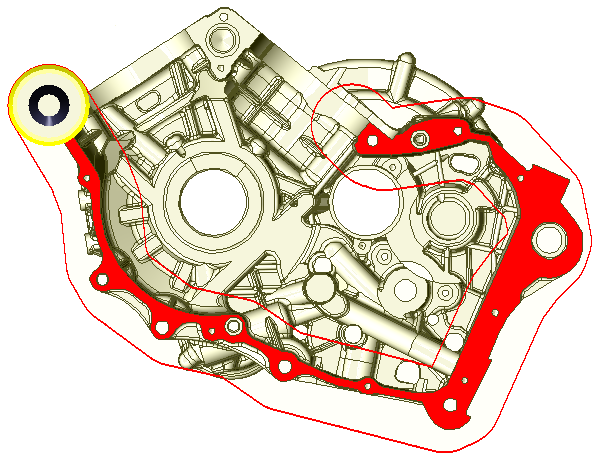
This cycle is very special, the selection of geometry is completely manual. The user defines manually the path followed by the tool. You have to choose the tool first, so that, during the selection of geometry, you can visualize the trace of the path and avoid possible obstacles.
|
|
|
▶️ You can watch a video on Mouse Facing:
|
Strategy Parameters
|
Dialog Area |
Parameters |
|
|
Toolpath Strategy |
Strategy |
|
|
Calculation of Z Steps |
Z step (Ap) |
|
|
Allowances |
|
|
Movement Parameters
|
Dialog Area |
Parameters |
|
|
Safety (in Z) |
||
|
Approach and return in Z |
||
|
Rapid Ret. altitude |
||
|
Motions between Z approach and XY leadin |
|
|
|
Leadin and leadout in XY |
||
Technology Parameters
|
Dialog Area |
Parameters |
|
|
Cutting Conditions |
Quality |
Cutting Speed |
|
Feedrate/tooth |
Spindle direction |
|
|
Level |
Spindle speed |
|
|
Feedrate |
||
|
Sp. speed range |
||
|
|
||
|
Tool Numbering |
Tool number |
Specific Number |
|
Length compensation number |
Diameter compens.Nb |
|
|
Users Fields |
Comment |
Control Device |
|
Milling Set |
|
|

Options Parameters
|
Dialog Area |
Parameters |
|
|
Behaviour on the clamps and components |
||
|
Safety area |
||
|
Curves Computing |
Curve segmentation |
|