

|
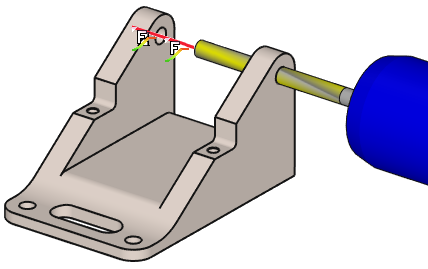
Clevis mode enables to accelerate motions between two or more axial holes. |
Key Points
|
This mode aims to accelerate the feedrate between two or more axial holes. Mandatory rules to program a clevis operation:
Click here for more detailed explanation: Clevis |
|
Strategy Parameters
|
Dialog Area |
Parameters |
|
|
Depth |
Depth |
|
|
Retract |
|
|
|
|
Final dwell |
|
Movement Parameters
|
Dialog Area |
Parameters |
|
|
Safety (in Z) |
||
|
Approach and return in Z |
||
|
|
||
Technology Parameters
|
Dialog Area |
Parameters |
|
|
Cutting Conditions |
Quality |
Cutting Speed |
|
Feedrate/tooth |
Spindle direction |
|
|
Level |
Spindle speed |
|
|
Feedrate |
Rapid feed |
|
|
Sp. speed range |
||
|
|
||
|
Tool number |
Specific Number |
|
|
Length compensation number |
Diameter compens. Nb |
|
|
Users Fields |
Comment |
Control Device |
|
Milling Set |

|
|
Options Parameters
|
Dialog Area |
Parameters |
|
|
Behaviour on the clamps and components |
||