
Cycle: Deep Drill, Clevis
Definition
Definition of the depth calculation according to the type of element selected.
Type of hole: the type of element selected is very important to understand the way the depth is calculated.
There are three types of elements:
-
Through holes: if the hole selected is a through hole (information given during the creation of the hole), then the machining always goes through material, the depth parameters are not necessary.
-
Blind holes: a depth is defined in the hole feature.
-
Circles: there is no depth defined in the element. This is a special case.
There are four types of depth calculation that are offered:

|
|

|
|

|
|

|
|
|
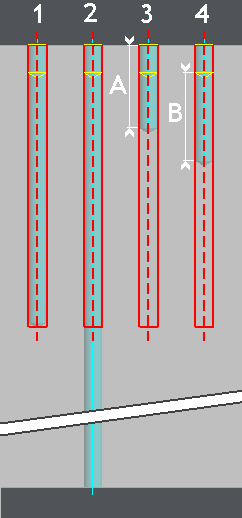
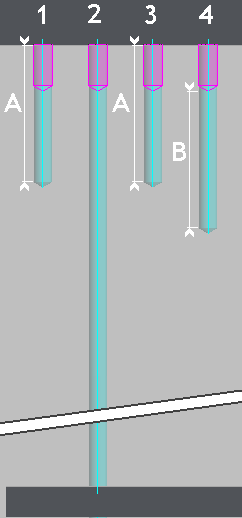
Entity (case 1):
Stock (case 2): The machining is done through material. Manual / Entity (case 3): A value has to be entered manually in the field Depth (value A). The depth is defined according to the entity (hole or circle) Z positioning. Manual / Stock (case 4): A value has to be entered manually in the field Depth (value B). The depth is defined according to the stock value. As a pre piercing operation is defined, the depth is calculated from the bottom of the pre pierced hole. |
Blind holes |
Circles |
|
|