
Cycles: All 3X milling cycles ( Rough/Rework, Finishing)
Definition
|
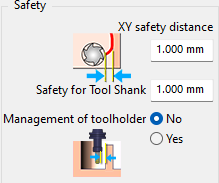
Safety parameters in the Movement tab that allow to manage the collisions of the tool and toolholder with the part. 3 parameters are provided, which are explained below. |
|
XY safety distance |
Defines a safety value considered during lead-in and lead-out of the tool in the X-Y plane. |
|
|
Safety for Tool Shank |
This value computes the toolpath of the tool by taking into account the tool shank diameter and offsetting the toolpath by the defined value to avoid any collision between the shank and the stock. If the shank and the cut diameter are equal the safety value is not applied. The trick is to make the shank diameter slightly larger than the cutting diameter. Make sure the precision settings are high enough to be able to view the decimal values. |
|
|
Management of toolholder |
Set to Yes to check toolholder shape and avoid collisions with stock. Collisions between tools and geometry are managed automatically. Holder-to-geometry collisions are managed for Z toolpaths. |
|
|
Watch a video demonstrating the application of the Safety for Toolshank and Management of toolholder parameters. |

|
|