
Definition
Cycles: Equidistant, 5X Equidistant

|
For the two cycles above, you can select a drive profile during geometry selection. Drive profiles define the toolpath shape and can be open or closed, based on solid or 2D geometry. They combine with limitation profiles to create toolpaths in specific zones. |
The toolpath type depends on the combination of drive and limitation profiles. The illustrations below show the possible options.
Drive profile is in RED.
Limitation profile is in GREEN.
Resulting toolpath is in BLUE.
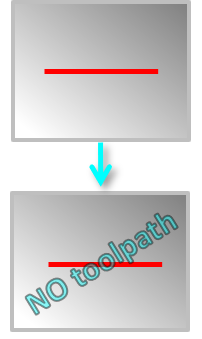
Drive : Open Limitation: None |
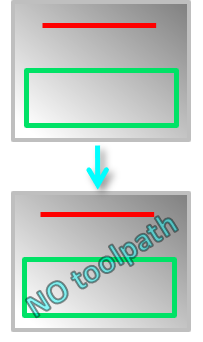
Drive : Open Limitation: Drive profile outside |
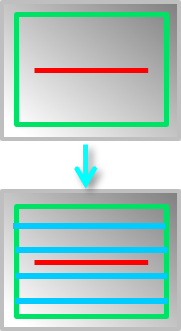
Drive : Open Limitation: Drive profile within |
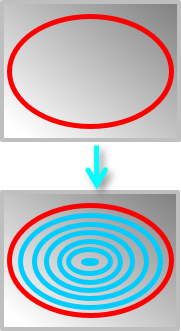
Drive : Close Limitation: None |
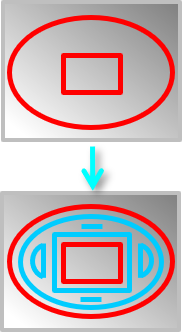
Drive : Close, multiple Limitation: None |
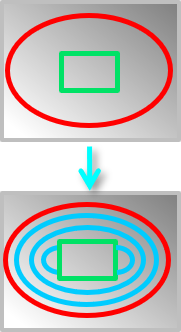
Drive : Close Limitation: Drive profile outside |
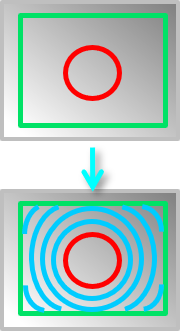
Drive : Close Limitation: Drive profile within |
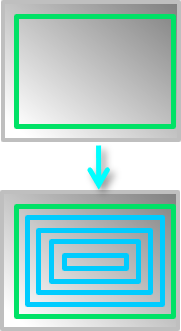
Drive : None Limitation: Defined |
Cycles Parameters affecting Drive and Limitation Profiles
|
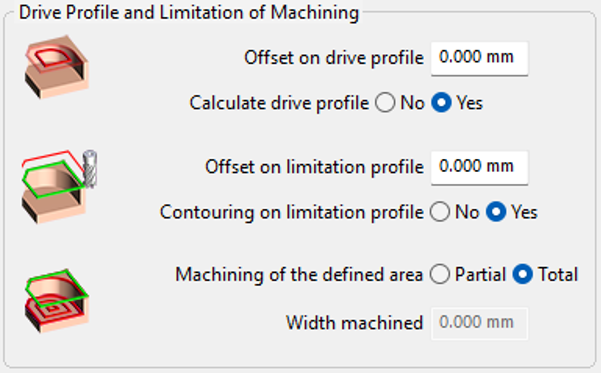
Additional strategy parameters are accessible for the 2 cycles, allowing further manipulation of the drive and limitation profiles for toolpath computation.
|
|
|
|
Offset on drive profile |
Positive or Negative value can be inserted to enlarge or shrink the initial profile. |
|
|
Calculate drive profile |
In the case of no drive and limitation profile defined: Yes: Toolpath computation on the whole part No: No computation! |
|
|
Offset on limitation profile |
Positive or Negative value can be inserted to enlarge or shrink the initial profile. |
|
|
Contouring on limitation profile |
Yes: Program a contouring along the limitation profile No: No contouring conputed. |
|
|
Machining of defined area |
||