
Cycle: Facing Pocket, Facing Roughing / Z Repeat Facing
Definition
These parameters allow you to manage a contouring on the pockets, islands and on the contour of the face.
First define if you want a contouring or not:

|
|

|
|

|
|
Contouring
When pockets and islands are defined in the Facing profile, we can generate a finishing contour on them.
An allowance on the profile(s) can be added using the 3 available options: After - Before - None.
|
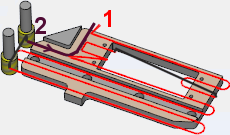
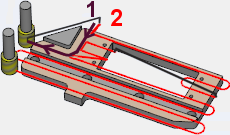
After: the facing is done first (1), then the contouring is programmed (2). |
Before: the first toolpath (1) is the contouring, then the facing is done (2). |
|
|
___________________________________________________________________________________________________________________
The following options are available only for Z Repeat Facing
Among the Contouring options, if you choose either After or Before, you are proposed three types of contouring:
-
Total: the contouring is made on each type of geometry: opened and closed pockets, islands etc.
-
Partial: the contouring is made only on closed pockets and islands.
-
Retract: the contouring is made only on closed pockets and islands, but the tool retracts after the first contour and plunge.
With the parameter XY Stock for finish, you can leave a thickness of the material reserved for contouring.